 StorageNinja

Data Helper
Valid Turkish test data (TCKN, VKN, IBAN) and one-click form filling, with preview, undo and CSV / XLSX export.
Then copy, paste and edit everything else the page keeps: Local Storage, Session Storage, Cookies, IndexedDB and Cache Storage.
eyJhbGciOiJSUzI1NiIsInR5cCI6IkpXVCJ9.eyJzdWIiOiJ1c2VyQGV4YW1wbGUuY29tIn0.example

Open it with Alt+Shift+S. Each storage type has copy, paste, clear and details.
Looks through Local Storage, Session Storage and cookies, including tokens nested inside JSON. Refresh tokens and expired tokens are skipped. Pin a different source per site if you need to.
Copy the token as it is, or as Bearer <token> for an Authorization header.
Pasting asks whether to keep existing keys or delete them first.
Save a site's storage and cookies, then switch back with one click. Handy for moving between test users.
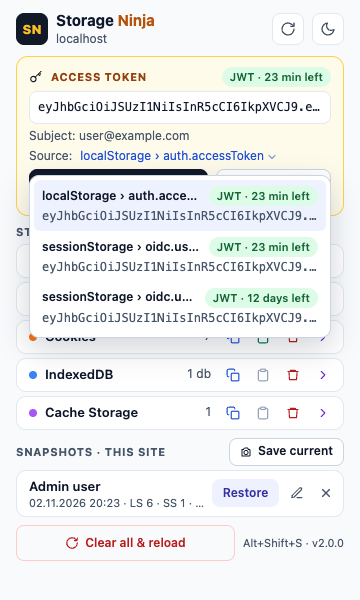
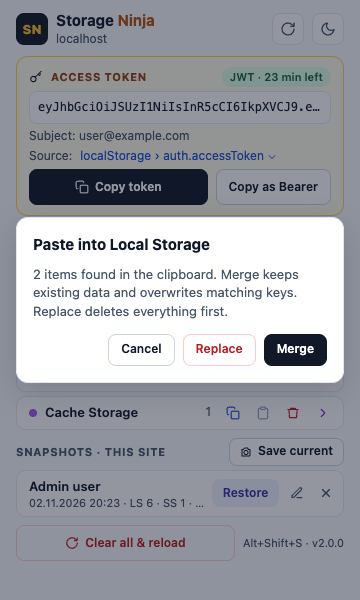
Search, edit and delete keys. JWTs are decoded with their expiry. JSON is formatted. Pick an iframe to see its storage too.
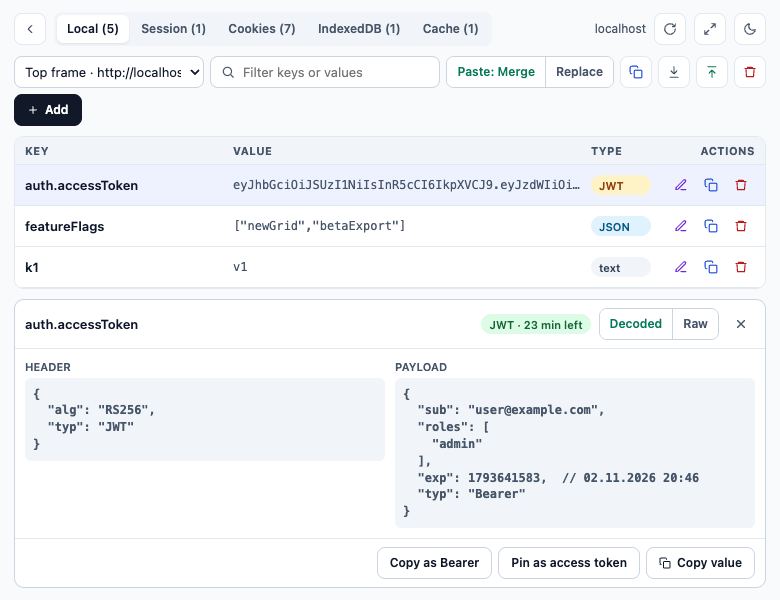
Local and Session Storage: values as text or JSON, JWTs decoded with exp and iat, Copy as Bearer, Pin as access token.
StorageNinja has no backend, no analytics and no account. Nothing is sent anywhere.
All code ships inside the extension. Nothing is downloaded at runtime.
Data leaves the extension only when you copy it or export a file. Snapshots are kept in Chrome's local extension storage.
| Permission | Why it is needed |
|---|---|
| cookies, <all_urls> | Chrome only allows reading HttpOnly and Partitioned cookies with host access. Data is read only when you use the extension. |
| activeTab, scripting | Read and write Local Storage, Session Storage, IndexedDB and Cache Storage of the current tab. |
| storage, unlimitedStorage | Settings, pinned token sources and snapshots, on your computer only. |
| contextMenus | The right-click menu. |
| clipboardRead, clipboardWrite, offscreen | Copy and paste from the right-click menu and the keyboard shortcut. |
| browsingData | Clear all & reload removes the site's service workers and remaining data. |
Free on the Chrome Web Store. Works in Chrome, Edge, Brave and other Chromium browsers (version 116 or later).
Valid Turkish test data (TCKN, VKN, IBAN) and one-click form filling, with preview, undo and CSV / XLSX export.

Records network requests, console errors and clicks in the background, so a bug report has everything when something breaks.